


How to Build a UGC Portfolio from Scratch and Land Your First Brand Deal
How to Build a UGC Portfolio from Scratch and Land Your First Brand Deal
No followers needed. Here's how to build a UGC portfolio from scratch — what to film, how to structure it, and how to get it in front of brands that pay.
Published:

Read Time:

5 min

Written by:
Fawwaz
Trend Research and Copywriter
THE AUDIENCE DOESN'T MATTER
For UGC creators, content quality is the asset brands are actually paying for.
THE AUDIENCE DOESN'T MATTER
For UGC creators, content quality is the asset brands are actually paying for.
THE AUDIENCE DOESN'T MATTER
For UGC creators, content quality is the asset brands are actually paying for.
A portfolio is how you prove that ability before a brand has worked with you. This guide covers how to build one from scratch, what to put in it, and how to get it in front of the right people.
What Makes a UGC Portfolio Different from an Influencer Media Kit
An influencer media kit is built around reach. The numbers that matter are follower count, average impressions, and engagement rate, because the brand is paying to access that audience.
Influencer Media Kit
Followers count is important
Followers = market that the influencer’s content can reach
UGC Portfolio
Followers count doesn’t matter
Right hook = Large video reach and views
Influencer Media Kit
Followers count is important
Followers = market that the influencer’s content can reach
UGC Portfolio
Followers count doesn’t matter
Right hook = Large video reach and views
A UGC portfolio is built around creative output. The brand wants to know one thing: can this creator produce a video that will work as a paid ad? The portfolio's job is to answer that question as quickly and unambiguously as possible. No follower count required.
This distinction matters because it changes what you put in the portfolio and how you present it. You're not proving you have an audience. You're proving you understand hook psychology, pacing, and what makes someone keep watching.
Briefly, here is how to build your UGC Portfolio:
How to Create a UGC Portfolio Using Canva | Shoot Your Ads |
Grab a UGC Portfolio Template | |
Structure Your Page for Conversions | |
How to Land Brand Deals With Your New Portfolio | Optimize and Upload |
Share with Brands | |
Enroll in an Agency |
Below is a comprehensive and detailed breakdown of how to build your UGC portfolio:
Part 1: Building the Portfolio
Step 1: Shoot Spec Ads Using Products You Already Own
You can start before you've worked with a single brand. Spec ads are sample videos you create using products from your own home, without a paid brief. They exist purely to demonstrate your creative ability.
Three formats cover most of what brands are looking for:
The Unboxing. |
The Problem/Solution. |
The Testimonial. |
Shoot three to five spec ads across these formats. You don't need all three types, but you do need enough variety to show range within your niche.
Step 2: Build the Portfolio Page in Canva
Canva's free website builder is the industry standard for UGC portfolios because it's fast, mobile-optimized, and doesn't require any technical knowledge. Search for "UGC Portfolio Template" inside Canva, select a website format, and choose something clean and minimal. The design should get out of the way of the videos.
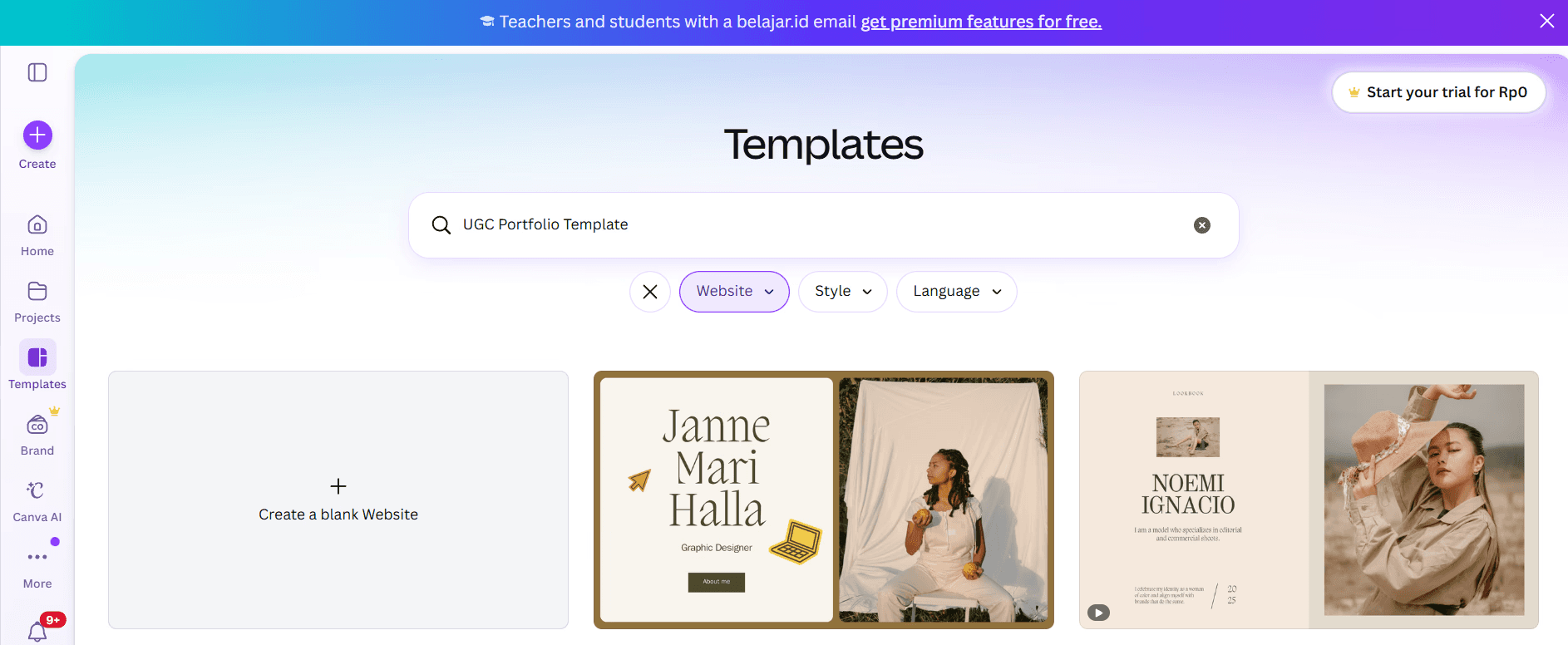
The page structure that works:
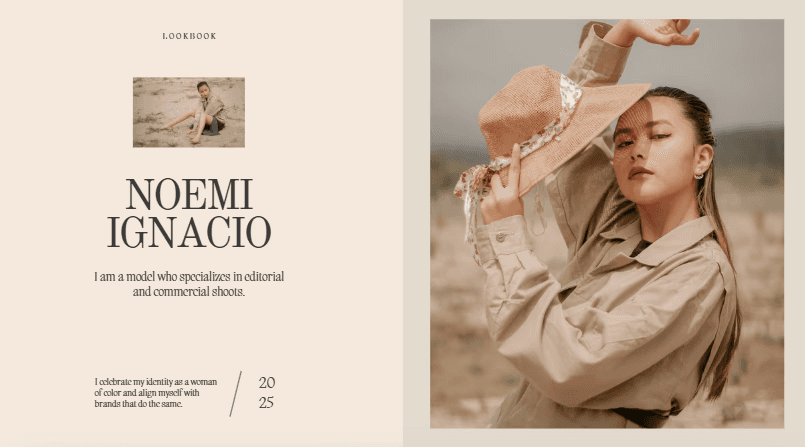
The Intro section — a clear photo of yourself, your name, your location, your niche (beauty and skincare, tech and apps, fitness, etc.), and a two-sentence bio. Keep it specific. "UGC creator specializing in health and wellness apps for the 25-35 demographic" is more useful to a brand than "content creator and digital enthusiast."
The Video Gallery — embed your spec ads directly into the page. Do not link to a Google Drive folder. Every extra click a brand has to make before seeing your work is friction that costs you the deal. Embed the videos so they play on the page without requiring the viewer to go anywhere.

Services and Rates — be explicit about what you offer and what you charge. A starting rate for a single video, a three-video package, and a five-video package is the standard format. If you don't list rates, brands will assume you're either too expensive or too inexperienced to have formed a view. Neither is good.

Contact — a single, clearly visible email address at the bottom. That's all. No contact form, no multi-step process.

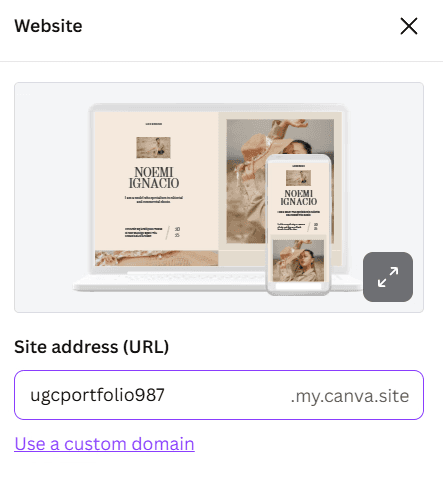
Once the page is published, add the link to your Instagram bio, TikTok bio, and LinkedIn profile. Your bio should clearly state "UGC Creator" so inbound brands can self-identify relevance before they click.
Part 2: Getting the Portfolio in Front of Brands
Step 3: Outbound Pitching
Don't wait for brands to find you. The fastest path to your first deal is direct outreach.
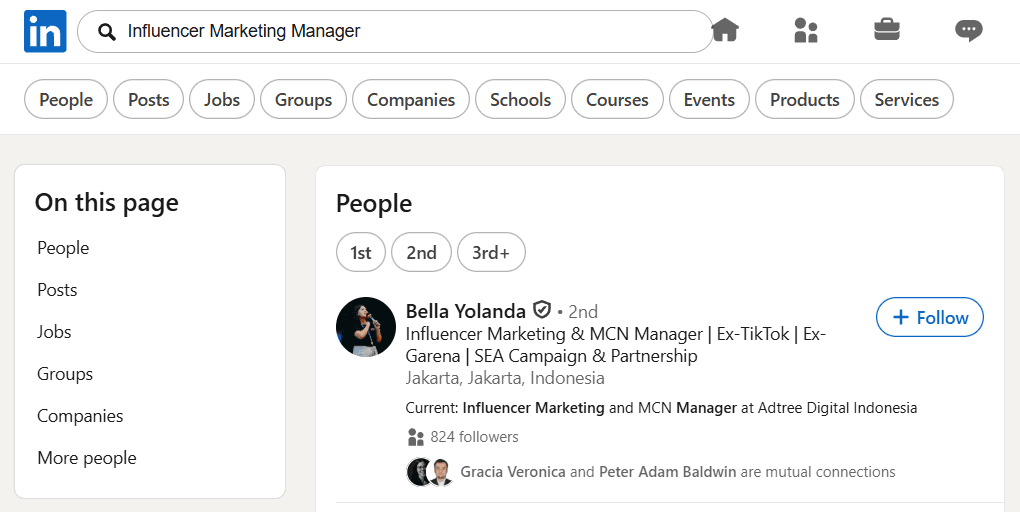
Find brands currently running paid ads by searching the TikTok Ad Library or Meta Ad Library. A brand actively spending on paid social is actively buying UGC. That's the audience you want. Search for their marketing contact on LinkedIn, with the job titles to look for are Influencer Marketing Manager, Growth Lead, or Content Manager.
The outreach message should be short and direct:
"Hi [Name], I noticed you're running TikTok ads in [their niche]. I'm a UGC creator who specializes in [relevant category]. I'd love to shoot some concepts for your next campaign. Here's my portfolio: [link]."
That's enough. The portfolio does the rest of the work. A long email explaining why you're great is noise. A short message with a link to proof is a signal.
Step 4: Apply to UGC Agencies
A mass cold-outreach approach is effective, but it’s time-consuming. By joining a UGC agency’s partner network, the agency handles brand connections, briefs, and payment structures, allowing you to focus on the creative aspects.

The tradeoff is that agencies are selective. A portfolio with three solid spec ads and a clean presentation is typically enough to get through most application processes. Having a defined niche helps significantly, because agencies place creators based on category fit.
Joining an agency is not a replacement for outbound pitching early on. It's a layer you add once your portfolio demonstrates enough range that an agency sees you as a reliable placement.
What Separates Portfolios That Get Responses from Ones That Don't
A strong portfolio makes three things immediately clear: your niche, the types of videos you can create, and how brands can hire you. Once you have that foundation in place, joining an agency can help accelerate your growth.
At Masterhooks, creators get access to top brands, ready-to-shoot briefs, and consistent opportunities, making it easier to focus on creating content and building a sustainable UGC career.
Ready to work with brands that send structured briefs and pay reliably?

Ready to work with brands that send structured briefs and pay reliably?
A portfolio is how you prove that ability before a brand has worked with you. This guide covers how to build one from scratch, what to put in it, and how to get it in front of the right people.
What Makes a UGC Portfolio Different from an Influencer Media Kit
An influencer media kit is built around reach. The numbers that matter are follower count, average impressions, and engagement rate, because the brand is paying to access that audience.
Influencer Media Kit
Followers count is important
Followers = market that the influencer’s content can reach
UGC Portfolio
Followers count doesn’t matter
Right hook = Large video reach and views
A UGC portfolio is built around creative output. The brand wants to know one thing: can this creator produce a video that will work as a paid ad? The portfolio's job is to answer that question as quickly and unambiguously as possible. No follower count required.
This distinction matters because it changes what you put in the portfolio and how you present it. You're not proving you have an audience. You're proving you understand hook psychology, pacing, and what makes someone keep watching.
Briefly, here is how to build your UGC Portfolio:
How to Create a UGC Portfolio Using Canva | Shoot Your Ads |
Grab a UGC Portfolio Template | |
Structure Your Page for Conversions | |
How to Land Brand Deals With Your New Portfolio | Optimize and Upload |
Share with Brands | |
Enroll in an Agency |
Below is a comprehensive and detailed breakdown of how to build your UGC portfolio:
Part 1: Building the Portfolio
Step 1: Shoot Spec Ads Using Products You Already Own
You can start before you've worked with a single brand. Spec ads are sample videos you create using products from your own home, without a paid brief. They exist purely to demonstrate your creative ability.
Three formats cover most of what brands are looking for:
The Unboxing. |
The Problem/Solution. |
The Testimonial. |
Shoot three to five spec ads across these formats. You don't need all three types, but you do need enough variety to show range within your niche.
Step 2: Build the Portfolio Page in Canva
Canva's free website builder is the industry standard for UGC portfolios because it's fast, mobile-optimized, and doesn't require any technical knowledge. Search for "UGC Portfolio Template" inside Canva, select a website format, and choose something clean and minimal. The design should get out of the way of the videos.
The page structure that works:
The Intro section — a clear photo of yourself, your name, your location, your niche (beauty and skincare, tech and apps, fitness, etc.), and a two-sentence bio. Keep it specific. "UGC creator specializing in health and wellness apps for the 25-35 demographic" is more useful to a brand than "content creator and digital enthusiast."
The Video Gallery — embed your spec ads directly into the page. Do not link to a Google Drive folder. Every extra click a brand has to make before seeing your work is friction that costs you the deal. Embed the videos so they play on the page without requiring the viewer to go anywhere.
Services and Rates — be explicit about what you offer and what you charge. A starting rate for a single video, a three-video package, and a five-video package is the standard format. If you don't list rates, brands will assume you're either too expensive or too inexperienced to have formed a view. Neither is good.
Contact — a single, clearly visible email address at the bottom. That's all. No contact form, no multi-step process.
Once the page is published, add the link to your Instagram bio, TikTok bio, and LinkedIn profile. Your bio should clearly state "UGC Creator" so inbound brands can self-identify relevance before they click.
Part 2: Getting the Portfolio in Front of Brands
Step 3: Outbound Pitching
Don't wait for brands to find you. The fastest path to your first deal is direct outreach.
Find brands currently running paid ads by searching the TikTok Ad Library or Meta Ad Library. A brand actively spending on paid social is actively buying UGC. That's the audience you want. Search for their marketing contact on LinkedIn, with the job titles to look for are Influencer Marketing Manager, Growth Lead, or Content Manager.
The outreach message should be short and direct:
"Hi [Name], I noticed you're running TikTok ads in [their niche]. I'm a UGC creator who specializes in [relevant category]. I'd love to shoot some concepts for your next campaign. Here's my portfolio: [link]."
That's enough. The portfolio does the rest of the work. A long email explaining why you're great is noise. A short message with a link to proof is a signal.
Step 4: Apply to UGC Agencies
A mass cold-outreach approach is effective, but it’s time-consuming. By joining a UGC agency’s partner network, the agency handles brand connections, briefs, and payment structures, allowing you to focus on the creative aspects.
The tradeoff is that agencies are selective. A portfolio with three solid spec ads and a clean presentation is typically enough to get through most application processes. Having a defined niche helps significantly, because agencies place creators based on category fit.
Joining an agency is not a replacement for outbound pitching early on. It's a layer you add once your portfolio demonstrates enough range that an agency sees you as a reliable placement.
What Separates Portfolios That Get Responses from Ones That Don't
A strong portfolio makes three things immediately clear: your niche, the types of videos you can create, and how brands can hire you. Once you have that foundation in place, joining an agency can help accelerate your growth.
At Masterhooks, creators get access to top brands, ready-to-shoot briefs, and consistent opportunities, making it easier to focus on creating content and building a sustainable UGC career.
Ready to work with brands that send structured briefs and pay reliably?
Related Reading


Need help scaling?
Book a strategy call with our expert team to audit your current UGC setup.
Related Reading
How Apple Turns a Product Launch Into a Yearly UGC Event That Runs Itself
How Apple's September launch cycle turns anticipation, information scarcity, creators, and product novelty into a recurring UGC engine.
4 min
|
How Apple Turns a Product Launch Into a Yearly UGC Event That Runs Itself
How Apple's September launch cycle turns anticipation, information scarcity, creators, and product novelty into a recurring UGC engine.
4 min
|

The Sydney Sweeney Novig Playbook: Why the Most Talked-About Ad of NFL Week 1 Was Also the Smartest
How Sydney Sweeney and Novig built a smarter celebrity partnership through equity, creative control, brand fit, and strategic timing.
4 min
|
The Sydney Sweeney Novig Playbook: Why the Most Talked-About Ad of NFL Week 1 Was Also the Smartest
How Sydney Sweeney and Novig built a smarter celebrity partnership through equity, creative control, brand fit, and strategic timing.
4 min
|
Why “September” by Earth, Wind & Fire Is the Most Viral Song on TikTok Every Year
Discover why Earth, Wind & Fire’s September goes viral on TikTok each year, and how brands can plan for predictable seasonal virality.
4 min
|
Why “September” by Earth, Wind & Fire Is the Most Viral Song on TikTok Every Year
Discover why Earth, Wind & Fire’s September goes viral on TikTok each year, and how brands can plan for predictable seasonal virality.
4 min
|